


Givebacks
3.548.00 Reviews
App Specs
- Version
- 3.6.7
- Updated On
- License
- Free
- Downloads
- 100,000+
- Developer
- Givebacks, Inc.
- Categories
- Shopping
- Platform
- Android
Screenshots
 Analysis by AppCompare
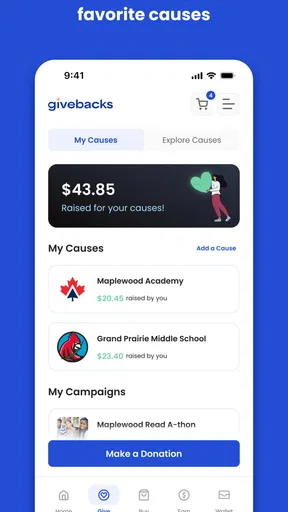
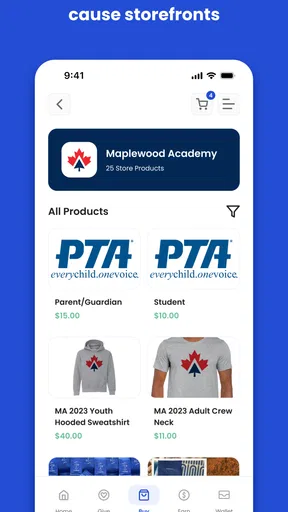
I approached Givebacks as a shopping app with a community purpose rather than as another place to browse products. Its central idea is simple: everyday purchases can be connected with support for a child’s school. That makes the app most interesting for families, teachers, relatives, and school communities that want a practical way to turn routine shopping into participation.
My experience was less about discovering a huge retail catalog and more about understanding the path from opening the app to completing a useful action. That distinction matters. If you expect the speed and familiarity of a major marketplace, Givebacks may feel more deliberate. If your priority is supporting a school while shopping, its focused approach makes more sense.
Givebacks is free, developed by Givebacks, Inc., and listed for Everyone. It belongs to the shopping category, although its real value sits at the intersection of shopping and school fundraising. The app was released on March 25, 2022, and its current version is 3.6.7, with support beginning at Android 7.0. It has passed over one hundred thousand installs, while its average stands at three and a half from more than one hundred ratings. Those figures suggest a real but still fairly modest user community, so I would approach it as a specialized tool rather than a universally established shopping service.
Where the Givebacks experience can slow you down
The first point of friction is understanding what you are supposed to do after launching. A normal shopping app usually makes the next step obvious: search, choose an item, and pay. Givebacks asks you to think about the school-support side of the process as well. That extra purpose is valuable, but it means a new user should not rush through the opening screens without checking which school, group, or participation path applies to them.
This is especially important when someone sends you to the app with a short message such as “use Givebacks for the fundraiser.” That instruction may be enough for a person already familiar with the service, but it can leave a first-time user wondering whether to create an account immediately, look for a school first, or begin with a shopping activity. I found that the safest approach is to pause and identify the intended school connection before treating the app like a conventional store.
Another possible stumble is confusing the shopping action with the final benefit. A purchase can feel complete once an order or transaction has been made, but school-support apps often require the user to follow a particular route for the activity to count. I would therefore avoid jumping between unrelated shopping apps or starting the same purchase in a browser before checking Givebacks. The useful habit is to begin inside the app and keep the process continuous.
That workflow is one of the app’s less obvious trade-offs. Givebacks can make school participation feel accessible because it fits around shopping people already do, but it also asks for more attention than simply donating once. Users who dislike checking whether a purchase followed the correct path may find a direct donation or a school-run event easier.
Worth Reading Before You Choose

EA SPORTS FC Mobile 26 Is a Bigger Football Game, but It Takes Time

Flipboard Shows What News Apps Must Do Beyond the Feed

Switching to Android Auto Means Rethinking Your Driving Routine

Google Calendar Makes a Crowded Week Easier to Manage

Ludo King Makes the Most of the Minutes Between Plans

Baby Panda World Brings Quick Play to Modern Phones, but Its Game Library Feels Busy
What to check before creating a routine
I recommend deciding first who the app is for in your household. If you are a parent, you may want the school connection to reflect your child’s current school. If you are a grandparent, relative, or friend, the relevant choice may belong to someone else’s school community. Making that decision early prevents the common mistake of setting up an account around the wrong group and then having to untangle the setup.
It is also worth checking that the phone meets the basic software requirement. On Android, the app supports version 7.0 and later, so very old devices may be the reason an installation or update does not behave normally. On a modern phone, I would still make sure the operating system and the app itself are updated before diagnosing anything more complicated. The current app version is 3.6.7, and keeping the installed build current is a sensible first step when screens fail to load or a session behaves oddly.
Before beginning a shopping session, I would also confirm that the phone has a stable connection. A weak connection can produce symptoms that look like an account problem: a blank page, a delayed confirmation, or a screen that appears not to respond. Switching between mobile data and Wi-Fi, then reopening the app, is a simple check that often separates a connection issue from an application issue.
One practical tip is to avoid treating the app as a background shortcut. Open it deliberately when you are ready to complete the relevant shopping activity. If you launch it days before buying anything and leave the process unfinished, you may return unsure about which screen was active or whether the school selection was saved. A clean start is easier to verify than a half-completed session.
A setup routine that reduces confusion
My preferred setup order is straightforward. First, install the app and allow it to finish loading. Next, read each account or school-selection screen instead of tapping through automatically. Then confirm that the displayed school or group matches your intention. Finally, close and reopen the app once, not as a ritual but as a quick way to make sure the basic setup remains visible after a fresh launch.
This check is useful for families sharing a device. If several people use the same phone, the person who completes the shopping may not be the person who performed the initial setup. I would leave a short note for other household members explaining which school connection to use and where to begin. That small handoff prevents a common failure: one person assumes the app is configured while another starts from an unrelated account or selection.
For a school organizer, the most helpful preparation is to give families a complete instruction rather than only the app name. Tell them the intended school or group, explain that they should start the shopping process inside Givebacks, and remind them to look for a completion or confirmation step. This is not about adding bureaucracy; it is about removing ambiguity for people who have never used a school-support shopping app.
I would not install it solely because someone says it is “like a shopping app.” Its usefulness depends on the school-support goal. If you only need to compare prices, track deliveries, or buy an item as quickly as possible, your usual retailer will probably be more efficient. Givebacks earns its place when the school connection is part of the reason you are shopping.
Recovering when a shopping session goes wrong
When something fails, the first thing I would do is identify the exact point of failure. Did the app fail to open, did the school connection look wrong, did the shopping route stop loading, or did the final confirmation never appear? These are different problems, and repeating the same tap will not solve all of them.
If the app will not open, I would force-close it, reopen it, and check the connection. If that does not help, restarting the phone is a reasonable general troubleshooting step. I would also check available storage and whether an update is waiting. These checks are deliberately basic: they address common device-level causes without assuming that Givebacks itself is broken.
If the app opens but a page remains blank, I would wait briefly, then try a different connection. A blank screen can come from a temporary network interruption, an overloaded service, or a device that has not completed a clean session. Reopening the app after changing the connection gives you a clearer test than repeatedly pressing the same control.
When the wrong school or group appears, I would stop before shopping. Continuing may create uncertainty about whether the activity is connected correctly. Look for the account or participation area that controls the association, and review the available choices carefully. If the app does not make the correction obvious, the safest response is to use the developer’s official support route rather than guessing or creating several new accounts.
A particularly important recovery habit is not to repeat a purchase immediately just because the confirmation screen was unclear. First check whether the original transaction or activity already completed through the retailer or payment method you used. Duplicate shopping is a much worse outcome than a delayed screen. Keep any order confirmation or receipt available while you investigate, because it gives support a concrete reference if assistance becomes necessary.
There is also a difference between an app session and a retail order. Givebacks may be the route that connects the shopping activity with school support, but it is not automatically the same thing as the retailer handling the order. If an item is late, damaged, canceled, or charged incorrectly, the retailer is usually the place to examine the order itself. If the issue is the school connection or the app workflow, Givebacks is the more relevant place to ask.
When the app is not the cause
Some complaints that appear to involve Givebacks are actually caused by the shopping destination, the phone, or the user’s own account state. For example, a product disappearing, a payment being declined, or a delivery estimate changing may have nothing to do with the school-support app. Separating those layers saves time and avoids blaming the wrong service.
I would use a simple three-part check. First, confirm that Givebacks opened normally and showed the intended school connection. Second, confirm that the retailer or shopping destination accepted the transaction. Third, check whether the issue concerns the order, the payment, or the school-support result. This approach is more useful than uninstalling immediately, especially when the order itself is still active.
Device settings can matter as well. A phone with aggressive battery management, limited storage, an outdated operating system, or restricted background activity may interrupt an app session. I would not change a large number of settings at once. Make one adjustment, reopen the app, and see whether the behavior changes. That way, you know which step helped and avoid creating new problems.
Privacy-conscious users may also prefer to review the app’s access requests and account details before using it regularly. I would provide only the information needed for the account and participation process, and I would avoid sharing login details with other family members. For a shared school effort, it is better for each person to understand their own role than for one account to circulate informally among many people.
The app’s average rating of 3.5 from roughly one hundred twenty ratings reflects a mixed reception rather than a universal verdict. I read that as a reason to set realistic expectations: the concept can be useful, but the experience may depend heavily on how clearly the school community explains the workflow and how smoothly the shopping route behaves on a particular device.
How it compares with familiar alternatives
Compared with a standard marketplace, Givebacks is narrower and more purpose-driven. Major retailers generally win on product search, delivery tools, order history, and polished purchasing flows. If those are your only priorities, I would choose the retailer directly. Givebacks is better suited to the moment when supporting a school is part of the purchase decision.
Compared with a one-time fundraiser, the app may fit more naturally into ordinary household spending. A direct event or donation can be clearer because you know exactly what you are contributing, while shopping-based support can require more care during each transaction. The trade-off is convenience versus certainty: Givebacks can work in the background of normal shopping, but only if the user follows the intended route.
Compared with a school website or email campaign, the app offers a more focused place to begin, but it cannot replace clear communication from the school. The best experience comes when the school explains the purpose and the user uses Givebacks for the actual participation step. Without that context, a new user may see a shopping tool without understanding why it matters.
That makes the app a poor fit for people who want a completely passive experience. You still need to notice the selected school, start from the correct place, and verify that the action finished. For families already comfortable with that small amount of attention, the process is reasonable. For shoppers who want the fastest possible checkout with no extra context, a conventional retailer is the less frustrating choice.
My practical verdict after using it
I would recommend Givebacks to families and school communities that want to connect regular shopping with school support and are willing to follow a defined workflow. Its strongest quality is not the shopping itself; it is the way the app gives a routine purchase a community purpose. The free price also makes it easy to try without committing money to the app.
I would introduce it gradually rather than asking an entire school to download it with minimal instructions. Start with one clearly explained shopping scenario, identify the correct school connection, and ask users to confirm the result before making the process part of their routine. That approach exposes setup friction early and gives families a chance to learn the workflow without risking a confusing first attempt.
There are three habits I consider especially valuable. Begin every relevant purchase inside Givebacks, verify the school or group before continuing, and keep the retailer’s confirmation separate from the app’s participation result. Those steps are simple, but they address the most consequential mistakes: starting in the wrong place, choosing the wrong community, and repeating a transaction because a screen was unclear.
I would skip it if your goal is only bargain hunting, fast product comparison, or advanced order management. Givebacks is not the replacement I would choose for a full-scale marketplace. I would also hesitate if your school has not explained how it expects families to use the app, because the community side is central to its usefulness.
For the right user, though, the focused design is a benefit. You are not installing another shopping app merely to browse; you are using a shopping route with a school-support purpose. Givebacks, Inc. has built a tool that can fit naturally into family routines, provided users treat the school connection as part of the purchase rather than an afterthought.
My final view is cautiously positive. The app is worth trying for parents, relatives, and school organizers who want a free way to make everyday shopping more meaningful. I would keep expectations practical, follow the setup checks, and troubleshoot the device and retailer separately before assuming the app is responsible. Used that way, Givebacks can be a useful bridge between shopping and school participation, even if it does not offer the effortless polish of the biggest shopping alternatives.
Pros
- Simple way to discover and support charitable cashback opportunities.
- Can turn everyday purchases into contributions without extra donations.
- Useful for users who want to track the impact of their shopping.
- Convenient access to participating brands and available offers.
- Encourages more mindful spending through cause-related rewards.
Cons
- Benefits depend heavily on the number of participating retailers.
- Cashback rates and available offers may change frequently.
- Some purchases may require following specific redemption rules.
- Charitable impact can be limited if users make few eligible purchases.
- The app may collect shopping or account data for personalization.
FAQs for Givebacks
What is Givebacks and how does the app work?
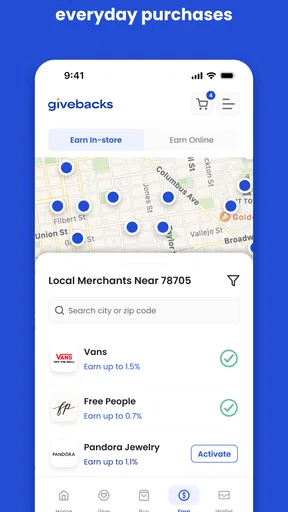
Givebacks is a fundraising and community-support platform that helps organizations, schools, teams, and causes raise money through everyday shopping and promotional activities. After creating or joining a participating group, users can discover available offers, shop through eligible partners, or complete supported actions. A portion of the qualifying purchase or activity is then directed back to the selected organization, according to the applicable campaign terms.
Is Givebacks free to download and use?
The Givebacks app is generally free to download, and creating an account or joining a participating organization typically does not require an upfront fee. However, some offers may have specific conditions, purchase requirements, exclusions, or expiration dates. The money spent on products or services still comes from the user, so it is important to review each promotion carefully before completing a transaction.
How do I support a school, team, nonprofit, or other organization with Givebacks?
To support an organization, you usually need to sign in or create a Givebacks account and then search for the relevant school, team, nonprofit, or community group. Once you select the correct organization, eligible purchases or activities made through the app can be connected to that group. Availability may depend on whether the organization is registered and which campaigns are currently active.
How are rewards or donations tracked in Givebacks?
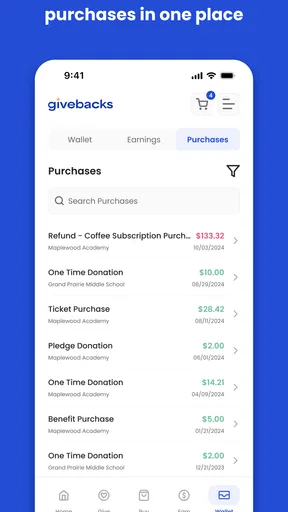
Givebacks normally tracks support through your account, linked offers, participating retailers, or qualifying campaign actions. Some activities may appear quickly, while others can take several days or longer to be confirmed because the purchase must be validated and returns or cancellations must be excluded. Always follow the instructions shown in the offer, including activating it before shopping when required.
What should I check before downloading and using Givebacks?
Before downloading Givebacks, check whether the organizations you want to support are available in your area and whether the retailers or offers you use most often participate on the platform. You should also review privacy permissions, account requirements, campaign restrictions, purchase exclusions, and payout or donation timelines. The app is most useful when local organizations and relevant shopping opportunities are actively supported.


